Activity Logging
- Default activity types
- Logging activities
- Retrieving activities for a user
- Logging to other handlers
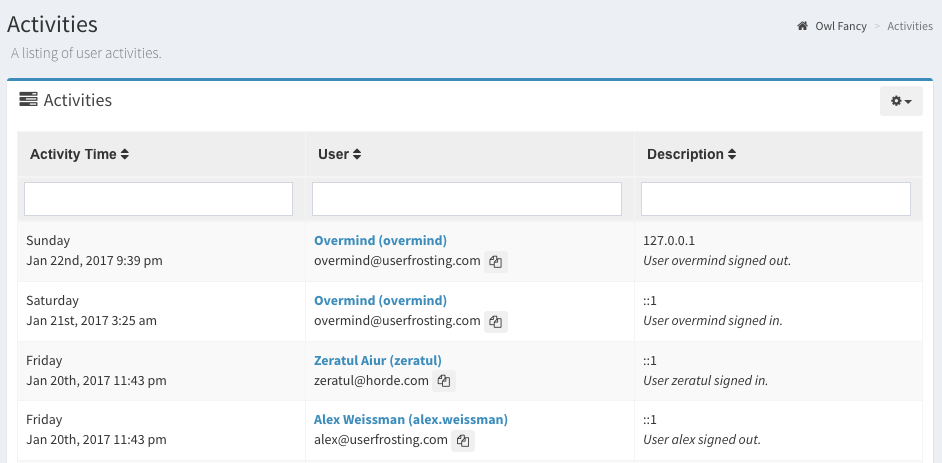
By default, user activities are logged to the activities database table. Logged information includes the activity time and an activity type, the user_id, the user's IP address, and a description of the activity. The administrative interface provides convenient tables for viewing these logs:
Default activity types
The following activity types are logged by the core UserFrosting features:
| Activity Type | Description |
|---|---|
sign_up |
The user signed up via the public registration page. |
sign_in |
The user signed in to their account. |
sign_out |
The user explicitly signed out of their account (note, this does not capture when a user's session expires on its own). |
verified |
The user verified their email address. |
password_reset |
The user reset their password. |
password_upgraded |
The user's password hash was automatically upgraded to modern hashing. |
update_profile_settings |
The user updated their profile settings (name, locale, etc). |
update_account_settings |
The user updated their account settings (email or password). |
group_create |
The user created a new group. |
group_delete |
The user deleted a group. |
group_update_info |
The user updated the details of a group. |
role_create |
The user created a new role. |
role_delete |
The user deleted a role. |
role_update_info |
The user updated the details of a role. |
role_update_field |
The user updated a specific attribute of a role (this includes modifying the permissions for a role). |
account_create |
The user created an account for another user. |
account_delete |
The user deleted another user's account. |
account_update_info |
The user updated basic account info for another user (name, email, locale, group). |
account_update_field |
The user updated a specific field for another user account (e.g., enabled/disabled status, verification status, password, roles). |
Note
These activities are only logged when successful. If a user is unable to perform one of these activities, for example because they don't have the necessary permissions or there is some other problem, the attempt won't be logged.
Logging activities
In your controller methods, simply call the info method on the userActivityLogger service to log additional activities:
/** @var \UserFrosting\Sprinkle\Account\Log\UserActivityLogger $userActivityLogger */
$userActivityLogger->info("User {$currentUser->user_name} adopted a new owl '{$owl->name}'.", [
    'type' => 'adopt_owl'
]);
The first parameter is the activity description. The second parameter contains an array, which should have a type key defined. The value of this key decides the activity type that will be logged. Note that these activity types are not defined anywhere explicitly - they are stored in the database as plain text and you may create new types on the fly when you log an activity.
Note
In general, you will probably want to log user activities at the end of the controller method, after the user's activity has completed successfully. However, you may choose to write to this log at any point in your code.
Retrieving activities for a user
The activities relation on the User model returns a collection of all activities for a user:
$activities = $user->activities;
The User model also provides a number of helper methods for user activities.
Getting a user's last activity
The id of a user's last activity is 'cached' in the users table under the last_activity_id column. This makes it more efficient to retrieve the user's last activity.
You can get the Activity record for a user's last activity using the lastActivity relation:
$lastActivity = $user->lastActivity;
Note
Notice that we reference this as an model property, rather than calling it as a method. If we called $user->lastActivity() (with parentheses) instead, it would return the relationship rather than the model itself.
Getting a user's last activity by type
If you want to get the last activity of a specific type, use the lastActivity method, with the type as argument:
$lastSignIn = $user->lastActivity('sign_in')->get();
Note
Since lastActivity(...) returns a Builder object, we need to call get to return the actual result.
Getting the time of a user's last activity
If we only want the timestamp of a user's last activity, we can can call lastActivityTime, with optional type as argument.
$lastSignInTime = $user->lastActivityTime('sign_in');
Getting the time since a user's last activity
The getSecondsSinceLastActivity method returns the number of seconds since the last time a user performed a particular activity:
$elapsedTime = $user->getSecondsSinceLastActivity('walked_dog');
Joining a user's last activity on a query
If you are querying the users table using the Eloquent query builder, you can join each user's last activity from the activities table:
$usersWithActivities = User::joinLastActivity()->get();
Logging to other handlers
By default, UserFrosting implements a custom Monolog handler, UserFrosting\Sprinkle\Account\Log\UserActivityDatabaseHandler, that sends user activity logs to the activities database table.
This is all assembled in the LoggersService service. If you'd prefer, you can extend or override the \UserFrosting\Sprinkle\Account\Log\UserActivityLogger class reference in the DI Container to add additional handlers, or even completely replace the custom handler altogether. For example, to replace the UserActivityDatabaseHandler with StreamHandler :
UserActivityLogger::class => function () {
    $handler = new StreamHandler('log://activities.log');
    $logger = new UserActivityLogger('userActivity', [$handler]);

    return $logger;
},
See the Monolog documentation for more details.